

Analog
Source
Processes the two balanced XLR/TRS mic/line inputs as 2 × mono, mono sum or 1 × stereo (L/R).
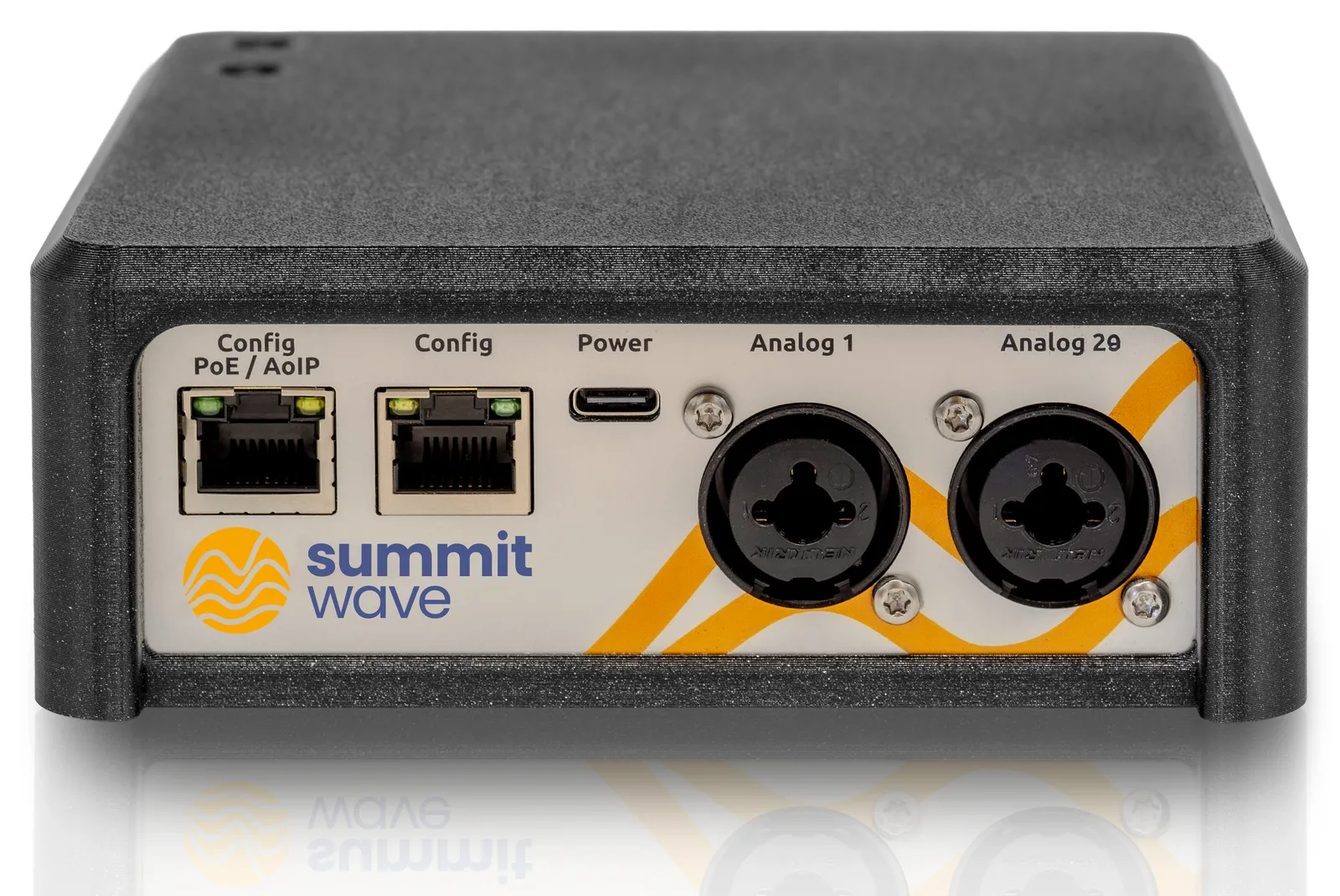
This manual guides you from commissioning and audio-mode selection through to complete configuration of the Auracast transmission.
The TX accepts audio from analogue or Dante-based audio systems and transmits it as Auracast streams to compatible receiving devices.
Analog
Source
Processes the two balanced XLR/TRS mic/line inputs as 2 × mono, mono sum or 1 × stereo (L/R).
Network Dante
Source
Receives audio channels from an existing Dante network.
Demo
Test
Generates test material for function and coverage checks without an external audio source.
The following specifications correspond to the Summitwave TX product datasheet DS-TX-EN, Rev. A (2026-07). Typical values can vary under real-world operating conditions.
| RF / Auracast | Specification |
|---|---|
| Radio standard | Bluetooth LE Audio (Core 6.0) |
| Auracast mode | Broadcast transmitter · up to 6 simultaneous streams |
| Frequency range | 2400–2482 MHz |
| Codec / sample rate / bit depth | LC3 · 16 / 24 / 32 / 48 kHz · 16 bit |
| Transmit power | max. +10 dBm |
| Encryption | AES-CCM · access code per stream |
| Typical range | 100 m |
| Typical end-to-end latency | 40 ms |
| Audio | Specification |
|---|---|
| Analog inputs | 2 × balanced XLR/TRS · mic/line |
| Audio modes | 2 × mono · mono sum · 1 × stereo (L/R) |
| Nominal line level | +4 dBu |
| SNR / THD+N | ≥ 105 dB · ≤ 0.05% (line at 0 dBu) |
| Internal processing | 48 kHz · 24 bit |
| Frequency response | 20 Hz–20 kHz (±1 dB at 48 kHz) |
| Dante | 6 channels · 100 Mbit/s · additional latency ≤ 4 ms |
| Network / power | Specification |
|---|---|
| Ethernet port 1 | LAN configuration and monitoring |
| Ethernet port 2 | LAN configuration + Dante + PoE (IEEE 802.3af) |
| IP addressing | DHCP · static IP · link-local |
| Management | Password-protected web interface over HTTP/HTTPS |
| Power | PoE (IEEE 802.3af) or USB-C 5 V; USB-C can also provide backup power |
| Recommended power supply | USB-C 15 W (5 V / 3 A) |
| Power consumption | 7 W max. · 3 W nominal |
| Mechanical / environment | Specification |
|---|---|
| Dimensions / weight | 134 × 134 × 50 mm (W × H × D) · 300 g |
| Enclosure / colour | PETG · white or black |
| Mounting | Wall / ceiling · 1/4″ female thread · mounting plate · cable ties |
| Operating temperature | −10 °C to +50 °C |
| Storage temperature | −40 °C to +60 °C |
| Compliance | CE (RED) · EN 62368-1 · EN 55032 · EN 55035 · RoHS · REACH · WEEE |
Configuration is carried out in a current web browser connected to the same network as the TX.
Connect the device
Use the Config port (port 1) for LAN configuration and monitoring, or the PoE + AoIP + Config port (port 2) when Dante and/or PoE are required. The Config port does not support PoE; a TX connected only there needs a USB-C power supply.
Start the device
Power the TX through PoE on the PoE + AoIP + Config port (IEEE 802.3af) or over USB-C with a power supply of at least 15 W (5 V / 3 A). Both supplies may be connected at the same time: the TX then keeps running if one of them fails. Wait approximately one minute for start-up to finish.
Open a browser
Start a current browser such as Chrome, Firefox or Edge.
Open the configuration address
Enter the device-specific .local address in the address bar and press Enter.
Confirm the certificate message
Open the advanced section in the browser warning and continue to the local device address. The browser reports NET::ERR_CERT_AUTHORITY_INVALID because the Summitwave CA is not preinstalled. The Quick Start Guide describes how to install the CA certificate permanently.
Sign in
Sign in on the login page. For a device in factory condition, the default password stated in the existing documentation is beacon.
In the Audio Mode field, select the source that matches your installation.
Demo
Testing
For coverage tests, acceptance testing and a general system function check.
Analog
XLR/TRS mic/line
For audio signals connected to the two balanced combo inputs.
Network Dante
Audio network
For integrating the TX into an existing Dante audio network.
In Demo mode you can configure and transmit an internal test signal without connecting an external audio source.
| Parameter | Description |
|---|---|
| Audio Mode | Switches between Demo, Analog and Network Dante. |
| Start Demo / Stop Demo | Starts or stops the test transmission. |
| Status indicator | Shows the current mode and state. Red indicates a stopped transmission and blue indicates an active transmission. |
| Audio level monitor | Displays the output audio levels while the stream is running. |
| Parameter | Description | Values |
|---|---|---|
| Demo Stream Type | Sets the channel count and sample rate of the test stream. | 1 × 48 kHz · 1 × 24 kHz · 1 × 16 kHz · 2 × 48 kHz · 2 × 24 kHz · 3 × 16 kHz · 4 × 24 kHz · 6 × 16 kHz |
| Demo Content | Selects the transmitted test material. | Program material · 1 kHz test tone |
| Stream Password | Optionally protects the stream from unauthorised access. Leave the field empty for a public broadcast. |
| Parameter | Description | Values |
|---|---|---|
| Assistive listening | Identifies the stream as assistive listening content for compatible receiving devices. | |
| Immediate rendering | Requests playback with the shortest possible delay at the receiver. | |
| Delay (ms) | Defines an additional playback delay in milliseconds. | |
| QoS | Prioritises robustness or low latency. | Robust · Fast |
| TX Power (R1/R2) | Sets the transmit power of the respective radio module. The maximum transmit power is +10 dBm according to the product datasheet. | max. +10 dBm |
In Analog mode, the TX processes the two balanced XLR/TRS mic/line inputs as 2 × mono, mono sum or 1 × stereo.
Two independent signals
Mono
Analog 1 and Analog 2 are used as separate audio channels.
One summed mono signal
Mono sum
Analog 1 and Analog 2 are combined into one mono source.
One stereo signal
Stereo
Analog 1 carries the left channel and Analog 2 carries the right channel.
| Parameter | Description | Values |
|---|---|---|
| Start Auracast / Stop Auracast | Starts or stops the Auracast transmission. | |
| Status indicator | Shows the mode and current transmission state. | |
| Link audio channel gain | Links the gain controls for channel 1 and channel 2. | |
| Ch 1 / Ch 2 Input Gain | Adjusts the input gain of the corresponding analogue channel. | −12 dB to +18 dB |
| Audio level monitor | Displays the audio levels while transmission is active. |
Radio 1 is the primary transmitter and is enabled by default.
| Parameter | Description | Values |
|---|---|---|
| Stereo Mode | Combines Analog 1 as the left channel and Analog 2 as the right channel in one stereo stream. | |
| Stream Quality | Sets the audio quality and sample rate. | High (48 kHz) · Good (32 kHz) · Medium (24 kHz) · Fair (16 kHz) |
| Stream Password | Optionally protects Radio 1 with a password. Leave the field empty for public streams. |
| Parameter | Description | Values |
|---|---|---|
| Assistive listening (R1) | Identifies the stream as assistive listening content. | |
| Immediate rendering (R1) | Requests playback with the shortest possible delay. | |
| Delay (ms, R1) | Defines an additional delay. | |
| QoS (R1) | Selects high robustness or low latency. | Robust · Fast |
| TX Power (R1) | Sets the transmit power of Radio 1. The maximum transmit power is +10 dBm according to the product datasheet. | max. +10 dBm |
This information helps users identify the correct stream on their receiving device.
| Parameter | Description | Values |
|---|---|---|
| Channel Name | A clear stream name that is visible on the receiving device. | |
| Language (ISO 639-3) | Three-letter language code for the content. | deu · eng |
| Program Info | A short description of the transmitted programme. | |
| Input Device | Assigns the physical source. | ch1 · ch2 · ch1+ch2 (Stereo) |
Enable Radio 2 when a second independent Auracast stream is required in parallel, for example for another language. The corresponding Radio 2 settings then become available.
In Dante mode, the TX receives audio from a Dante network and assigns it to one or more Auracast streams.
| Configuration per radio | Channels | Sample rate |
|---|---|---|
| High sample rate | 1 | 48 kHz |
| Medium channel count | 2 | 24 kHz |
| Maximum channel count | 3 | 16 kHz |
| Parameter | Description |
|---|---|
| Audio Mode | Selects Network Dante as the active audio source. |
| Start Auracast / Stop Auracast | Starts or stops the transmission. |
| Status indicator | Shows the current mode and transmission state. |
| Audio level monitor | Displays the output levels while the stream is running. |
| Parameter | Description | Values |
|---|---|---|
| Stereo Mode | Enables processing of a stereo signal. | |
| Stream Configuration | Sets the channel count and sample rate. | 1 × 48 kHz · 2 × 24 kHz · 3 × 16 kHz |
| Stream Quality | Selects the required audio quality. Higher settings use more transmission resources. | High (48 kHz) · Good (32 kHz) · Medium (24 kHz) · Fair (16 kHz) |
| Parameter | Description | Values |
|---|---|---|
| Assistive listening (R1) | Identifies the stream as assistive listening content. | |
| Immediate rendering (R1) | Requests playback with the shortest possible delay. | |
| Delay (ms, R1) | Defines an additional playback delay. | |
| QoS (R1) | Prioritises robustness or latency. | Robust · Fast |
| TX Power (R1) | Sets the transmit power of Radio 1. The maximum transmit power is +10 dBm according to the product datasheet. | max. +10 dBm |
Depending on the configuration, one to three stream sections are available per radio.
| Parameter | Description | Values |
|---|---|---|
| Channel Name | The stream name displayed on the receiving device. | |
| Language (ISO 639-3) | The language of the programme content. | deu · eng |
| Program Info | A short description of the transmitted content. | |
| Stream Password | Optional access protection. Leave the field empty for public streams. | |
| Input Device | Selects the Dante input channel. | dante_asrc_ch1 to dante_asrc_ch6 |
System Control brings together device status, network settings, security and maintenance functions.
| Parameter | Description |
|---|---|
| Status LED | Blue LED on while transmitting keeps the blue LED illuminated during an active audio transmission. |
| System temperatures | Shows current CPU and enclosure temperatures. Refresh updates the values. |
| Parameter | Description |
|---|---|
| Hostname | The individual device name on the network, for example swtx1005. |
| Port 1 (Config) | Provides LAN configuration and monitoring. |
| Port 2 (PoE + AoIP + Config) | Provides LAN configuration and Dante, and can power the TX through IEEE 802.3af PoE. |
| DHCP | Obtains the IP configuration automatically from a DHCP server. |
| Static IP | Uses a manually defined IP configuration. |
| Parameter | Description |
|---|---|
| CA Certificate | Download CA Certificate downloads the local security certificate for installation on an administered computer. |
| Change password | Changes the web-interface password. The current password and two matching entries of the new password are required. |
| Parameter | Description |
|---|---|
| Software Version | Shows the installed firmware. Check for updates searches for updates when an internet connection is available. |
| Reboot | Reboot now restarts the entire TX and briefly interrupts audio transmission. |
Check the power supply, network, source and transmission state before resetting settings or restarting the device.
| Problem | Check | Next step |
|---|---|---|
| Web interface cannot be reached | Check the LAN connection, .local address, IP configuration and that both devices are on the same network. | Determine an alternative IP address or contact the network administrator. |
| No stream is visible | Check the transmission state, radio activation, stream name and transmit power. | Start Demo mode and test with a second receiver. |
| Stream has no audio | Check Audio Mode, Input Device, input gain and the Audio level monitor. | Test the source directly or verify Dante routing. |
| Audio is unstable | Check QoS, transmit power, distance, obstacles and local RF conditions. | Select Robust and carry out a coverage test. |
| Dante does not respond | Check Dante routing and network status. | Restart the TX if required. |
| Property | Value |
|---|---|
| Document version | 2026-07 |
| Last updated | 29 July 2026 |